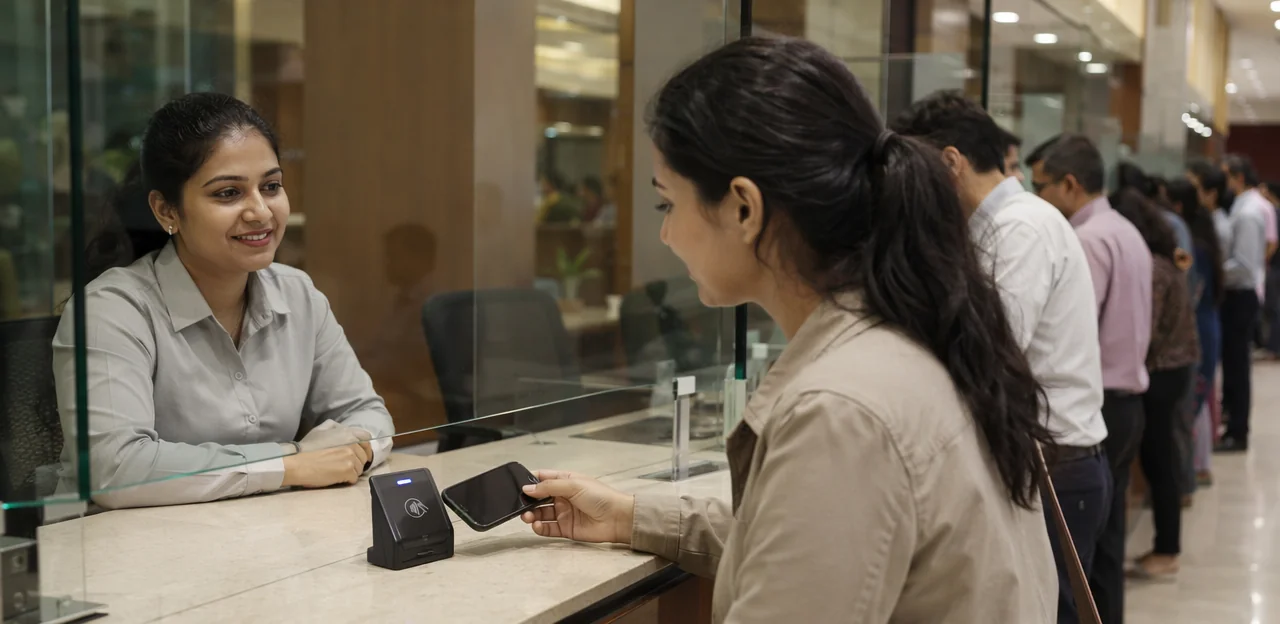
Every interaction at a service counter is a chance to shape the customer experience, yet many businesses still rely on outdated customer service feedback methods that capture too little, too late. Whether in retail, healthcare, hospitality, banking, transport, or public services, the moment a transaction ends is often the best time to ask for feedback on service—while the experience is still fresh and actionable. That is where nfc feedback service counter solutions are changing the game.
By combining tap-and-go NFC technology with QR touchpoints, businesses can collect customer service customer feedback instantly, without asking people to download an app or fill out long forms later. A simple tap can open a customer service feedback form, launch short customer feedback surveys, and route responses into AI-powered analytics that reveal trends, satisfaction drivers, and operational blind spots in real time.
This article explores how NFC feedback at service counters works across industries, why it outperforms traditional customer service feedback methods, and how organizations can use the insights to improve speed, staff performance, and overall satisfaction. It will also show how to use customer feedback to improve service through smarter touchpoint design, better survey strategy, and analytics that turn everyday interactions into measurable business improvement.
Why NFC feedback matters at service counters

What an NFC feedback service counter is
An nfc feedback service counter is a front-desk, checkout, or reception touchpoint that lets visitors tap a phone on an NFC tag or scan a QR code to instantly share feedback on service. Instead of relying only on delayed customer feedback surveys, it opens a mobile browser experience on the spot—often a quick rating, a short customer service feedback form, or a follow-up prompt.
Why it works across industries:
- Fast and frictionless: no app download, login, or paper form
- Context-aware: captures customer service customer feedback at the exact moment service happens
- Actionable: helps teams compare customer service feedback methods and spot issues faster
It fits reception desks, clinic check-ins, retail checkouts, hospitality front desks, help counters, and public service points because it makes customer service feedback immediate, measurable, and easier to use when deciding how to use customer feedback to improve service.
Why instant feedback beats delayed surveys
With nfc feedback service counter touchpoints, businesses capture customer service customer feedback at the exact moment an interaction ends, when details, emotions, and staff performance are still fresh. That makes customer feedback surveys more accurate and often far more likely to be completed than email-only follow-ups sent hours or days later.
- Higher response rates: quick tap-or-scan journeys reduce friction compared with delayed customer service feedback emails.
- Better quality insight: immediate feedback on service reflects real experiences, not faded memories.
- Faster fixes: frontline teams can spot issues and act before dissatisfaction grows.
- Smarter improvement: using the right customer service feedback methods, including a short customer service feedback form, shows how to use customer feedback to improve service in real time.
Instant feedback turns everyday counters into continuous improvement points.
Cross-industry use cases and customer experience benefits
An nfc feedback service counter model works across retail, healthcare, banking, hospitality, public services, and telecom because it removes friction at the exact moment of interaction. A quick tap or scan replaces long customer feedback surveys and boosts customer service feedback volume while the experience is still fresh.
- Retail counters: capture feedback on service after checkout or returns.
- Clinics and pharmacies: use a simple customer service feedback form at reception.
- Banks and government desks: gather customer service customer feedback without queues slowing down.
- Hotels and restaurants: collect instant insights at concierge or front desk touchpoints.
These low-effort customer service feedback methods help teams spot delays, training gaps, and service wins faster. The key to how to use customer feedback to improve service is acting on real-time patterns, then refining staffing, scripts, and processes accordingly.
How NFC and QR touchpoints collect better feedback

The customer journey from tap or scan to response
At an nfc feedback service counter, the journey is designed to be frictionless:
- Tap or scan: The customer taps an NFC tag or scans a QR code at the counter.
- Open instantly: A mobile-friendly customer service feedback form opens in the browser—no app, login, or download required.
- Answer a few quick questions: The form asks for simple ratings, comments, or feedback on service, making it one of the fastest customer service feedback methods available.
- Submit in seconds: With just a few taps, the customer sends customer service customer feedback before leaving.
This approach improves response rates compared with delayed customer feedback surveys. To understand how to use customer feedback to improve service, keep forms short, ask targeted questions, and review results regularly for patterns in speed, staff helpfulness, and overall customer service feedback.
Designing low-friction feedback prompts
For nfc feedback service counter setups, the goal is simple: collect feedback on service in seconds without interrupting flow. Keep every customer service feedback form short, visual, and easy to complete on any phone.
- Ask one clear question first: Start with a simple rating like “How was your service today?” This improves completion rates in customer feedback surveys.
- Use fast rating scales: Prefer 1–5 stars, emoji, or thumbs up/down for instant customer service customer feedback.
- Make comments optional: After the rating, offer a short text box for extra customer service feedback, but never require it.
- Support multiple languages: Detect browser language or let users switch instantly to improve customer service feedback methods across diverse audiences.
- Design for accessibility: Use large tap targets, high contrast, screen-reader-friendly labels, and plain language.
Low-friction prompts also make it easier to learn how to use customer feedback to improve service in real time.
When to use NFC, QR, or both at the counter
At a nfc feedback service counter, the best touchpoint depends on speed, device access, and visibility. For stronger customer service feedback, many brands use both.
- Use NFC for speed: A tap is fast, low-friction, and ideal for busy counters where customers may skip longer customer feedback surveys.
- Use QR for compatibility: QR works on nearly all smartphones, making it one of the most reliable customer service feedback methods when NFC is unavailable or turned off.
- Use both for visibility and hygiene: Clear signage with tap-or-scan options improves feedback on service while keeping interactions contactless.
Combining NFC and QR increases customer service customer feedback capture, supports a simple customer service feedback form, and gives teams more data on how to use customer feedback to improve service.
Building an effective feedback strategy across industries

Choosing the right questions for service counters
For nfc feedback service counter setups, keep customer feedback surveys short, specific, and easy to answer in seconds. The best customer service feedback methods combine ratings with one open-text prompt to capture both speed and detail.
- Satisfaction score: “How satisfied were you with today’s service?”
- Wait time: “Was your wait time acceptable?”
- Staff helpfulness: “How helpful and professional was our team?”
- Issue resolution: “Was your request or problem fully resolved?”
- Feedback on service: “What could we improve about this counter experience?”
A simple customer service feedback form should use tap-friendly scales, yes/no choices, and one optional comment box. This approach strengthens customer service customer feedback collection and shows how to use customer feedback to improve service by identifying delays, training gaps, and recurring service issues fast.
Tailoring feedback flows by industry
A single nfc feedback service counter model works across sectors when prompts, routing, and data handling match each environment:
- Retail: Capture post-purchase customer service feedback on speed, staff helpfulness, and stock availability with short customer feedback surveys.
- Healthcare: Use a simple customer service feedback form focused on wait times, clarity, and privacy, with compliant data collection and no unnecessary personal details.
- Banking: Ask for feedback on service after teller or advisory visits, with secure flows and audit-friendly records.
- Government: Keep forms multilingual, accessible, and structured around queue times and resolution quality.
- Education: Gather student, parent, or visitor input by department to improve support desks.
- Logistics: Track counter efficiency, document handling, and issue resolution.
- Hospitality: Tailor by reception, concierge, or checkout touchpoints; platforms like Tapsy can support no-app flows.
This is one of the most practical customer service feedback methods and shows how to use customer feedback to improve service through role-specific, compliant journeys.
Encouraging honest responses without pressure
To get useful feedback on service, design the nfc feedback service counter experience so customers feel safe being candid, not pushed to be positive.
- Place touchpoints thoughtfully: Position the tap/scan point slightly away from the staff member, such as at the counter exit, so people can complete customer feedback surveys privately.
- Use neutral wording: On the prompt and customer service feedback form, say “Tell us about your experience” instead of “Rate us 5 stars.” This improves customer service customer feedback quality.
- Offer anonymity options: Let users submit customer service feedback anonymously, with contact details optional for follow-up.
- Train staff carefully: Teach teams to invite responses without hovering, coaching, or asking only happy customers.
These simple customer service feedback methods produce more honest insights and show how to use customer feedback to improve service in real time.
Using AI and analytics to improve service quality

Turning raw responses into actionable insights
With nfc feedback service counter touchpoints, the real value comes after collection: turning fast, in-the-moment responses into clear action. Modern dashboards help teams organize customer service feedback by location, shift, staff interaction, or issue type, so patterns appear quickly.
- Dashboards: View live scores, response volume, and recurring themes from customer feedback surveys or a simple customer service feedback form.
- Sentiment analysis: AI groups open-text feedback on service into positive, neutral, or negative trends, helping teams spot friction faster.
- Trend tracking: Compare weekly or monthly changes to see which customer service feedback methods drive better results.
- Location-level reporting: Break down customer service customer feedback by counter, branch, or department to identify repeat problems.
This is how to use customer feedback to improve service: detect issues early, coach teams faster, and fix operational gaps before they spread.
Spotting patterns by time, team, and location
With nfc feedback service counter data, businesses can turn everyday feedback on service into clear operational insight. Instead of treating responses as isolated comments, analytics helps teams see where service issues repeat and what to fix first.
- By time: Track results by hour or day to uncover peak-hour pressure, long waits, or rushed interactions.
- By team: Compare shifts or staff groups to identify coaching opportunities, training needs, and strong performers.
- By location: Review branch-level trends to spot differences in service quality, process consistency, or local staffing gaps.
This makes customer service feedback measurable and easier to act on. When paired with simple customer feedback surveys or a quick customer service feedback form, businesses can see how to use customer feedback to improve service through better scheduling, targeted training, and smarter customer service feedback methods that strengthen overall customer service customer feedback programs.
Closing the loop with alerts and service recovery
An nfc feedback service counter becomes far more valuable when feedback triggers action immediately. Instead of letting customer service feedback sit in a dashboard, AI-assisted workflows can detect low ratings, negative sentiment, or urgent feedback on service and alert the right manager in real time.
- Set score-based alerts: Flag poor responses from customer feedback surveys or a quick customer service feedback form at the counter.
- Route issues automatically: Send complaints about wait times, staff behavior, or product quality to the relevant supervisor or department.
- Enable fast recovery: Managers can follow up on the spot, offer a solution, and prevent churn.
This is how to use customer feedback to improve service: turn customer service customer feedback into immediate action using smarter customer service feedback methods.
Implementation best practices and common mistakes

Placement, signage, and staff adoption
For an effective nfc feedback service counter setup, place tags or stands where customers naturally pause: beside the payment terminal, pickup area, reception desk, or exit point. Keep the prompt short, visible, and action-led.
- Use countertop stands, decals, or small signs at hand height with clear wording like “Tap to share feedback on service.”
- Add a QR fallback for customers without NFC and link to a simple customer service feedback form.
- Keep branding clean and explain the value: fast customer feedback surveys, rewards, or service improvement.
- Train staff to invite customer service customer feedback naturally: “If you have a second, you can tap here and tell us how we did.”
- Review responses often to learn how to use customer feedback to improve service and refine your customer service feedback methods.
Privacy, consent, and data quality considerations
For nfc feedback service counter programs, trust matters as much as response volume. To keep customer feedback surveys compliant and useful:
- Use clear consent language at the tap point and before submission, stating what data is collected, why, and whether the customer service feedback form is anonymous or identified.
- Offer both anonymous and identified options where appropriate; regulated sectors may need stricter disclosure and retention controls for customer service customer feedback.
- Reduce duplicate or fraudulent feedback on service with one-time tokens, session limits, timestamp checks, or device-level safeguards.
- Secure customer service feedback with encryption, role-based access, and minimal data collection.
Strong governance improves data quality and supports how to use customer feedback to improve service across industries.
Common pitfalls that reduce response rates
Even a well-planned nfc feedback service counter setup can underperform if the experience feels frustrating or unclear. Common mistakes include:
- Too many questions: Long customer feedback surveys reduce completion rates. Keep each customer service feedback form short and focused on immediate feedback on service.
- Poor mobile design: If pages load slowly or display badly on phones, users drop off fast.
- Unclear calls to action: Tell customers exactly what to do and what they gain from sharing customer service customer feedback.
- Hidden QR codes or broken NFC links: Make touchpoints visible, tested, and easy to access.
- No follow-through: One of the biggest failures in customer service feedback methods is collecting data but not acting on it. To understand how to use customer feedback to improve service, close the loop with visible service improvements.
Measuring success and scaling your program

Key metrics for service counter feedback programs
Track the KPIs that show whether your nfc feedback service counter setup is actually improving service:
- Tap-to-response rate: Measures how many customers who tap actually start giving customer service feedback.
- Completion rate: Shows whether your customer service feedback form or customer feedback surveys are short and clear enough to finish.
- Satisfaction score: Use CSAT or similar ratings to monitor feedback on service in real time.
- Issue resolution trends: Track complaint types, response times, and repeat problems to understand how to use customer feedback to improve service.
- Comment themes: Analyze open-text customer service customer feedback for recurring topics.
- Operational improvements: Link insights to staffing, wait times, training, and process changes across customer service feedback methods.
How to use customer feedback to improve service continuously
Turn nfc feedback service counter responses into a simple weekly improvement loop:
- Review patterns often: Combine tap-based customer service feedback, customer feedback surveys, and each customer service feedback form to spot recurring issues in speed, staff helpfulness, or clarity.
- Prioritize fixes: Rank feedback on service by frequency, business impact, and ease of action.
- Coach teams fast: Share real examples from customer service customer feedback in short huddles and turn them into clear service standards.
- Test one change at a time: Adjust scripts, staffing, signage, or queue flow, then measure results.
- Track and repeat: Compare scores and comments weekly to learn how to use customer feedback to improve service continuously across all customer service feedback methods.
Scaling from one counter to multiple locations
To scale an nfc feedback service counter program, start with a master template for every customer service feedback form so each branch collects the same core metrics. Then localize only what matters: language, store name, service type, and region-specific questions.
- Standardize fields: Keep rating scales, complaint tags, and key customer feedback surveys consistent.
- Compare branches: Use shared dashboards to track trends in customer service customer feedback and benchmark locations fairly.
- Localize intelligently: Adapt wording and rewards by market without changing reporting structure.
- Expand with rules: Assign location IDs, tags, and regional filters to preserve clean analytics.
This makes feedback on service easier to compare and shows how to use customer feedback to improve service across all regions.
Conclusion
In a world where speed, convenience, and personalization shape every interaction, nfc feedback service counter solutions give organizations a smarter way to capture insights at the exact moment service happens. Instead of relying only on delayed customer feedback surveys, businesses across retail, healthcare, hospitality, banking, and public services can collect real-time customer service feedback with a simple tap or scan. That means more relevant feedback on service, faster issue resolution, and better data for teams focused on improving the customer journey.
The real value of an nfc feedback service counter is not just higher response rates—it is turning customer service customer feedback into action. Whether you use a quick rating flow, a digital customer service feedback form, or multilingual touchpoints supported by AI and analytics, the goal is the same: understand what customers experience and respond quickly. Among today’s most effective customer service feedback methods, NFC stands out for being frictionless, contactless, and easy to deploy.
To move forward, review your current feedback process, identify high-traffic service counters, and choose tools that make it easy to analyze trends and act on results. If you’re exploring how to use customer feedback to improve service, start with a pilot program, track performance, and refine from there. Platforms like Tapsy can help businesses modernize feedback collection and turn every service counter into a measurable customer experience touchpoint.
Frequently Asked Questions
- What is an NFC feedback service counter?
It is a service desk, checkout, reception, or help counter where customers can tap an NFC tag or scan a QR code to open a feedback form instantly. The goal is to collect feedback on service right after the interaction, without requiring an app download or login.
- Why does instant counter feedback work better than delayed email surveys?
It captures customer impressions while the experience is still fresh, which improves accuracy and makes responses more actionable. Tap-or-scan flows also reduce friction, so people are often more likely to complete them than later follow-up surveys.
- How does the customer journey work from tap or scan to submission?
A customer taps an NFC tag or scans a QR code at the counter, which opens a mobile-friendly feedback form in the browser. They answer a few quick questions, such as a rating or short comment, and submit the response in seconds before leaving.
- Should a business use NFC, QR codes, or both at a service counter?
NFC is best for speed because a tap is fast and low-friction at busy counters. QR codes offer broad compatibility across smartphones, so using both usually gives better visibility, accessibility, and response capture.
- What makes a customer service feedback form effective at a counter?
The form should be short, visual, and easy to complete on any phone. A strong setup starts with one clear question, uses fast rating scales, keeps comments optional, and supports accessibility and multiple languages where needed.
- What questions should be asked in a service counter feedback survey?
Useful questions focus on satisfaction, wait time, staff helpfulness, issue resolution, and what could be improved. The best format combines tap-friendly ratings or yes/no choices with one optional open-text comment.
- Which industries can use NFC feedback at service counters?
It fits retail, healthcare, banking, hospitality, public services, telecom, education, and logistics. Common use cases include checkout counters, clinic reception desks, hotel front desks, teller stations, and government service points.
- How should feedback flows be adapted for different industries?
Each sector should tailor prompts, routing, and data handling to its environment. For example, healthcare should focus on wait times, clarity, and privacy, while retail may emphasize speed, staff helpfulness, and stock availability.
- How can businesses encourage honest feedback without making customers feel pressured?
Place the tap or scan point slightly away from staff so customers can respond privately. Use neutral wording, allow anonymous submissions, and train employees to invite feedback without hovering or steering customers toward positive ratings.
- How do AI and analytics improve service after feedback is collected?
Dashboards can organize responses by location, shift, staff interaction, or issue type so patterns become visible quickly. AI can also group open-text feedback by sentiment and recurring themes, helping teams detect problems early and act faster.
- What kinds of patterns can teams identify from service counter feedback data?
They can track trends by time, team, and location to find peak-hour pressure, training gaps, or branch-level service differences. These patterns support better scheduling, targeted coaching, and more consistent service processes.
- How can low ratings trigger faster service recovery?
Businesses can set alerts for poor scores, negative sentiment, or urgent comments so the right manager is notified quickly. Complaints about wait times, staff behavior, or product quality can then be routed to the relevant supervisor for immediate follow-up.
- What setup mistakes usually reduce response rates at service counters?
Common problems include asking too many questions, using poor mobile design, and giving unclear instructions. Hidden QR codes, broken NFC links, and collecting feedback without acting on it also weaken results.
- What privacy and data quality measures matter in an NFC feedback program?
Clear consent language should explain what data is collected, why it is collected, and whether responses are anonymous or identified. Strong programs also use minimal data collection, secure access controls, encryption, and safeguards such as session limits or timestamp checks to reduce duplicate or fraudulent submissions.
- Which metrics should be tracked when scaling from one counter to multiple locations?
Key metrics include tap-to-response rate, completion rate, satisfaction score, issue resolution trends, comment themes, and operational improvements tied to staffing or process changes. To scale cleanly, businesses should standardize core fields and reporting while localizing only details like language, store name, or region-specific questions.