What if the easiest way to improve campus life was already in every student’s pocket? As universities and colleges look for faster, more meaningful ways to understand student needs, QR codes are emerging as a simple but powerful feedback tool. A well-placed student feedback QR code can turn everyday campus moments into valuable insights, helping institutions capture opinions while experiences are still fresh.
From lecture halls and libraries to cafeterias, residence halls, and student services, QR-based feedback makes it easier to hear from students in real time. Instead of relying only on long end-of-term surveys, campuses can collect quick, targeted responses at the exact touchpoints that shape the student experience. That means faster issue detection, better service improvements, and more responsive decision-making across departments.
In this article, we’ll explore practical use cases for QR code student feedback across campus, including classrooms, events, support services, shared spaces, and facilities. We’ll also look at how these touchpoints can boost participation, streamline feedback collection, and help institutions act on concerns before they escalate. Where relevant, solutions like Tapsy show how no-app QR and NFC touchpoints can support a more connected, student-centered campus experience.
Why QR Code Feedback Works in Higher Education

How QR codes reduce friction in student feedback collection
A student feedback QR code removes the biggest barriers to participation: extra steps, delayed timing, and survey fatigue. Instead of asking students to open an email later or log into a portal, universities can collect responses in seconds at the exact moment an experience happens.
- Instant access: Students scan with their phone and respond immediately—no app download, password, or long form.
- Faster completion: Short mobile-first surveys fit naturally between classes, after lectures, or while leaving a campus service point.
- More accurate feedback: In-the-moment responses capture fresh impressions from classrooms, libraries, cafeterias, and events.
- Higher participation rates: A visible QR code feedback for universities strategy meets students where they already are: on mobile.
For best results, place codes at exits, desks, and high-traffic areas, and keep surveys to 1–3 questions.
Benefits of real-time, location-based feedback
Placing a student feedback QR code in the exact place an experience happens helps institutions collect more useful insights, faster. Instead of relying on delayed surveys, teams can act on real-time student feedback while the context is still fresh.
- Better context: Feedback tied to a library floor, dining hall, lab, residence hall, or event gives clear location-based detail, reducing guesswork.
- Faster issue detection: Repeated low ratings at one touchpoint can quickly flag problems such as cleanliness, Wi-Fi outages, long queues, or accessibility barriers.
- More actionable data: Location-based campus feedback helps teams identify patterns by building, service point, or time of day, making it easier to prioritize fixes and measure improvement.
Platforms like Tapsy can support this no-app, on-site feedback approach across campus touchpoints.
Where QR and NFC touchpoints fit into the student experience
NFC and QR touchpoints support students at the moments that matter most, making campus interactions faster, simpler, and easier to measure. Across hybrid learning and in-person services, they connect physical spaces with digital actions without requiring an app.
They work especially well for:
- Self-service support: let students tap or scan to access timetables, wayfinding, IT help, or library services
- Hybrid student services: link desks, kiosks, and online portals so feedback and requests flow across channels
- Real-time engagement: place a student feedback QR code in classrooms, cafeterias, labs, and student support areas to capture quick responses while experiences are still fresh
- Campus-wide insights: use student experience technology to identify friction points, improve response times, and refine services
Tools like Tapsy can help institutions deploy these touchpoints consistently across campus.
Practical Student Feedback QR Code Use Cases Across Campus
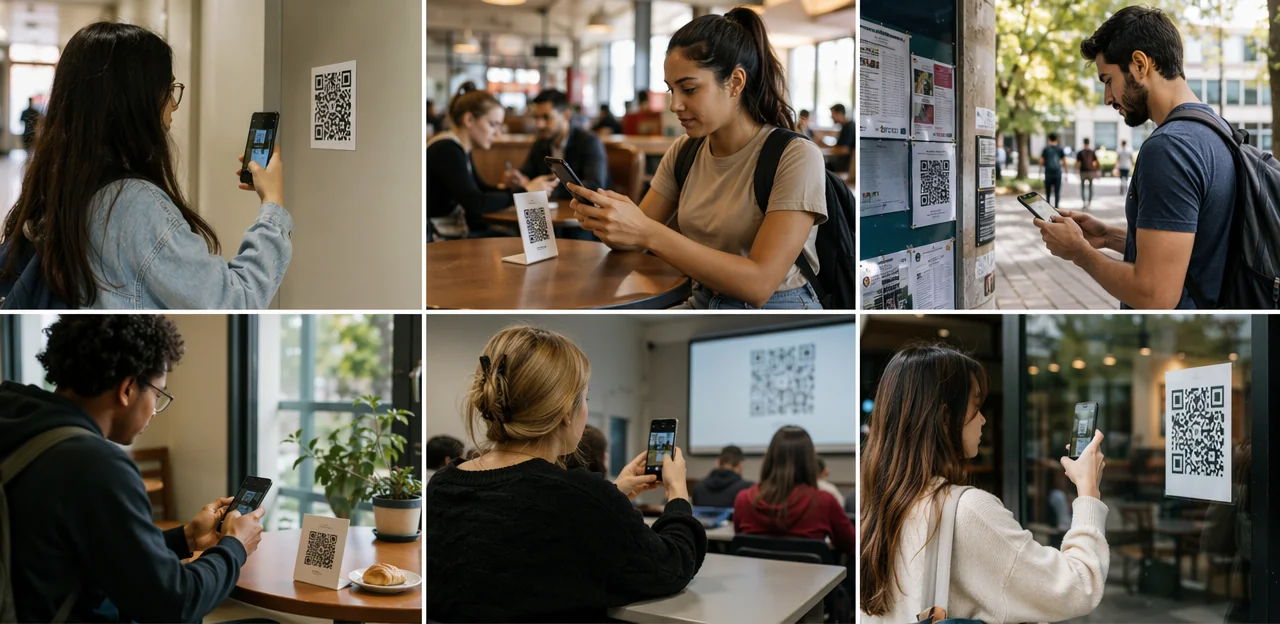
Academic spaces: classrooms, labs, and libraries
Academic departments can place a student feedback QR code at the exit of classrooms, inside labs, and across library zones to collect fast, location-specific insight while the experience is still fresh. This makes it easier to improve teaching environments, spot equipment issues early, and understand how students use study spaces.
Practical uses include:
- Classrooms: A classroom feedback QR code can ask 2–3 pulse-survey questions on room temperature, seating comfort, audio-visual quality, visibility of screens, and how well the space supports learning.
- Labs: QR codes near workstations can capture feedback on equipment availability, broken devices, software access, safety concerns, and technician support.
- Libraries: For stronger library student feedback, codes can be placed in silent study areas, group rooms, help desks, and self-service stations to measure noise levels, seat availability, Wi-Fi reliability, and staff support.
Keep surveys short and actionable:
- Rate the space from 1–5
- Select an issue category
- Add an optional comment or photo
Platforms such as Tapsy can help route urgent reports to facilities, IT, or library teams for faster resolution.
Student services: advising, admissions, and support centers
Student-facing offices can use a student feedback QR code at exits, reception desks, kiosks, and follow-up emails to capture reactions while the visit is still fresh. This approach works especially well for advising, admissions, financial aid, disability support, counseling intake, and international student services, where timing and clarity strongly shape the experience.
A simple QR code survey for campus support should take less than a minute and focus on the metrics teams can act on right away:
- Wait time: Was the student seen on time? Was the queue reasonable?
- Staff helpfulness: Did the student feel listened to, respected, and supported?
- Clarity of information: Were next steps, documents, deadlines, or policies explained clearly?
- Overall satisfaction: Did the visit solve the issue or move it forward?
To improve student services feedback quality, keep surveys short with:
- A 1–5 rating scale
- One optional comment box
- A category selector for issues needing follow-up
Tools like Tapsy can help teams collect immediate feedback at the service touchpoint, spot recurring problems, and respond faster when scores drop.
Campus life: dining, housing, events, and recreation
QR feedback points help universities collect campus experience feedback exactly where students live, eat, socialize, and exercise. A well-placed student feedback QR code makes it easy to capture quick reactions while the experience is still fresh, leading to faster fixes and better decisions.
Universities can place a student satisfaction QR code at key touchpoints such as:
- Residence halls: gather feedback on cleanliness, maintenance response times, noise, safety, and shared spaces.
- Cafeterias and coffee spots: monitor food quality, wait times, menu variety, dietary options, and seating availability.
- Gyms and recreation centers: track equipment issues, overcrowding, class demand, locker room conditions, and staff helpfulness.
- Student events: measure turnout, organization, accessibility, enjoyment, and suggestions for future programming.
To make results actionable, keep forms short with 1–3 rating questions and one optional comment box. Route low scores or repeated complaints to the right team automatically, whether housing, dining, or campus recreation. Platforms like Tapsy can support no-app QR feedback at physical touchpoints, helping institutions spot patterns early, improve services, and strengthen overall student satisfaction.
How to Design Effective QR Feedback Touchpoints

Choosing the right placement and call to action
A student feedback QR code performs best when it appears at the right moment, in the right place, with a clear reason to scan. Visibility, timing, and context all directly influence participation.
- Use high-visibility spots: Follow QR code placement best practices by placing codes on signage, posters, table tents, counters, and exit points at eye level with strong contrast and minimal clutter.
- Match the moment: Put codes where the experience just happened, such as after a lecture, at a help desk, in a cafeteria, or near library exits.
- Keep the CTA specific: A strong feedback QR code CTA should be short and action-focused, such as:
- Rate today’s session in 20 seconds
- Tell us how this space worked for you
- Scan to improve campus services
Tools like Tapsy can support touchpoint-based feedback across campus.
Creating short, mobile-friendly feedback forms
To get responses from a student feedback QR code, keep every mobile feedback form fast, clear, and thumb-friendly. Good student survey design removes friction and respects students’ time.
- Limit length: Aim for 3–5 total questions. Put the most important question first in case students drop off early.
- Use simple rating scales: 1–5 stars, emoji scales, or “Very poor” to “Excellent” work well on small screens and are easy to tap.
- Keep wording short: One idea per question. Avoid jargon, long introductions, and matrix-style grids.
- Add one optional open-text prompt: For example, “What should we improve?” This captures context without slowing completion.
- Reduce drop-off: Use large buttons, no login requirement, minimal scrolling, and a visible progress bar.
- Trigger forms in context: Tools like Tapsy can help deliver quick, no-app feedback at campus touchpoints.
Branding, accessibility, and trust considerations
A student feedback QR code works best when students instantly recognize it as official, safe, and easy to use. To increase scans and completion rates across diverse campus groups:
- Use clear branding: Add university colors, logos, and a short purpose statement so posters, table tents, and signage feel legitimate rather than promotional clutter.
- Design for accessibility: Pair the code with high-contrast text, large fonts, plain language, and screen-reader-friendly landing pages. An accessible QR code feedback flow should also avoid long forms and support mobile usability.
- Be transparent about data use: Include a brief note explaining what is collected, whether responses are anonymous, and who can view them. Strong student survey privacy messaging reduces hesitation.
- Set expectations: Tell students how long it takes and what happens next.
Tools like Tapsy can support branded, no-app feedback journeys at campus touchpoints.
Turning Feedback Into Actionable Campus Improvements

Routing responses to the right teams
A strong campus feedback workflow turns each student feedback QR code scan into a clear next action. Instead of sending all comments to one inbox, map each QR code location and form category to the team responsible for fixing it.
- Facilities: route reports from restrooms, classrooms, libraries, and residence halls for cleaning, maintenance, heating, lighting, or accessibility issues.
- Academic departments: send lecture, lab, or course-space feedback to program leads or faculty administrators.
- Student affairs: direct concerns about wellbeing, inclusion, orientation, or campus life to support teams.
- Service teams: assign dining, IT help desk, transport, or admissions feedback to operational managers.
For better student feedback management, use tags, alerts, and ownership rules so urgent issues reach the right team fast. Tools like Tapsy can help automate routing and improve accountability.
Using dashboards and trends to spot recurring issues
A student feedback QR code system becomes far more useful when responses are aggregated into clear dashboards. Instead of reacting to one-off complaints, campus teams can use student feedback analytics to identify repeated issues by location, service, or time period.
- Track low ratings by touchpoint, such as libraries, dining halls, labs, or student services
- Compare trends over weeks or semesters to spot recurring maintenance, cleanliness, or wait-time problems
- Review comment themes to understand shifts in student sentiment and priorities
- Set alerts for repeated negative feedback so urgent issues reach the right team quickly
These dashboards turn raw responses into campus experience insights that leaders can act on. For example, if one residence hall repeatedly reports heating issues, facilities teams can prioritize repairs before dissatisfaction spreads.
Closing the loop with students
To close the feedback loop, students need to see that their input leads to visible change. When a student feedback QR code captures concerns about Wi-Fi, study spaces, or cafeteria queues, sharing what happened next builds credibility and increases future student engagement feedback.
Practical ways to communicate action taken include:
- On-site signage: “You asked for more charging points — 12 new stations installed in the library.”
- Email updates: Send short monthly “You said, we did” summaries with completed fixes and upcoming changes.
- Digital screens: Use screens in halls, cafeterias, and student unions to highlight improvements made from recent feedback.
Keep updates specific, timely, and location-based. Platforms such as Tapsy can help institutions connect feedback collection with clear follow-up messaging across campus touchpoints.
Implementation Tips, Challenges, and Measurement

Launching a pilot program on campus
Start your student feedback QR code rollout with a focused, low-risk test in 3–5 high-traffic areas, such as the library entrance, cafeteria, student services desk, and a busy lecture hall. A practical QR code feedback pilot should include:
- Choose clear goals — track response rate, recurring issues, and satisfaction by location.
- Keep surveys short — use 1–3 questions plus an optional comment field.
- Assign owners — route feedback to facilities, IT, or student support teams quickly.
- Review results weekly — identify what works before wider campus QR code implementation.
- Refine and scale — improve signage, question wording, and placement before expanding across departments or campuses.
Common challenges and how to avoid them
Common QR code feedback challenges usually come down to friction, ownership, and follow-through. To make a student feedback QR code program work, focus on a few practical fixes:
- Low scan rates: Place codes at high-traffic decision points, add clear calls to action, and explain the benefit in one line.
- Survey fatigue in higher education: Keep surveys to 1–3 questions and trigger them only at relevant moments.
- Unclear ownership: Assign each touchpoint to a named team with response targets.
- Poor signage: Use visible, branded signs with simple instructions and mobile-friendly landing pages.
- Data silos: Route responses into one dashboard or workflow tool so facilities, academics, and student services can act quickly.
Platforms like Tapsy can help centralize feedback and alerts across campus touchpoints.
Key metrics to track success
To measure whether a student feedback QR code program is working, focus on a small set of actionable student feedback KPIs:
- Scan rate: How many students scan the code compared with total footfall at each location.
- Completion rate: The percentage of scans that turn into finished surveys; this is one of the most important QR code survey metrics.
- Response quality: Track comment length, relevance, and the share of usable feedback.
- Issue resolution time: Measure how quickly teams respond to and close reported problems.
- Satisfaction trends by touchpoint: Compare ratings across classrooms, libraries, dining, housing, and student services over time.
Tools like Tapsy can help centralize these metrics across campus touchpoints.
Conclusion
In a campus environment where experiences vary by location, time, and service, a student feedback QR code offers a simple way to capture honest input when it matters most. From classrooms and libraries to cafeterias, residence halls, student services, and campus events, QR-based feedback helps institutions collect real-time insights while the experience is still fresh. That means faster issue resolution, better service recovery, and stronger data for improving the overall student experience.
The most effective approaches keep feedback short, accessible, and action-oriented. A well-placed student feedback QR code can surface trends in teaching quality, facility conditions, support services, accessibility, safety, and event satisfaction—without adding friction for students or staff. Over time, these touchpoints create a clearer picture of what is working across campus and where immediate attention is needed.
If your institution is looking to modernize listening strategies, now is the time to pilot a student feedback QR code program in high-traffic or high-impact areas. Start with a few key touchpoints, track response patterns, and build workflows for alerts and follow-up. For teams that want a no-app way to gather feedback at physical campus touchpoints, solutions like Tapsy can be a useful place to explore next steps.
Frequently Asked Questions
- What is a student feedback QR code used for on campus?
A student feedback QR code lets students share quick feedback at the exact place and time an experience happens. Campuses can use it in classrooms, libraries, cafeterias, residence halls, events, and student service points to collect timely, location-specific input.
- Why do QR codes help increase student feedback participation?
They reduce friction by removing extra steps like app downloads, passwords, or delayed email follow-ups. Students can scan with their phone and complete a short mobile-friendly survey in seconds while the experience is still fresh.
- How is QR-based feedback different from end-of-term surveys?
QR-based feedback captures in-the-moment responses at specific touchpoints, while end-of-term surveys rely on delayed recall. This makes QR feedback more useful for spotting immediate issues such as noise, wait times, broken equipment, or Wi-Fi problems.
- Where should universities place feedback QR codes for the best results?
The strongest placements are high-visibility, high-traffic spots such as exits, desks, counters, kiosks, posters, table tents, and service points. Codes work best when placed right after the experience, such as outside a lecture room, near a help desk, or at a library exit.
- How many questions should a campus QR feedback form include?
Short forms perform best, usually with 1–3 questions for quick touchpoints and up to 3–5 total questions for mobile-friendly surveys. A simple structure can include a rating, an issue category, and one optional comment.
- What kinds of questions work well in classroom, lab, and library QR surveys?
Academic-space surveys should focus on practical factors students can assess immediately. Useful topics include room temperature, seating comfort, audio-visual quality, screen visibility, equipment availability, software access, noise levels, seat availability, Wi-Fi reliability, and staff support.
- How can student services teams use QR codes after advising or support visits?
Student services can place QR codes at exits, reception desks, kiosks, or in follow-up emails to capture feedback while the visit is still fresh. The survey should focus on wait time, staff helpfulness, clarity of information, and whether the visit solved or moved the issue forward.
- What are practical QR feedback use cases in dining, housing, recreation, and events?
Residence halls can collect feedback on cleanliness, maintenance response, noise, safety, and shared spaces. Dining areas can track food quality, wait times, menu variety, dietary options, and seating, while gyms and events can measure equipment issues, overcrowding, accessibility, organization, and enjoyment.
- How do QR and NFC touchpoints fit into the student experience?
QR and NFC touchpoints connect physical campus spaces with digital actions without requiring an app. They support self-service access to timetables, wayfinding, IT help, library services, hybrid service flows, and real-time feedback collection across campus.
- What makes a QR feedback call to action effective?
A strong call to action is short, specific, and tied to the immediate experience. Examples include asking students to rate today's session in 20 seconds, share how a space worked for them, or scan to improve campus services.
- How can universities make QR feedback more accessible and trustworthy?
Use clear university branding, high-contrast text, large fonts, plain language, and screen-reader-friendly landing pages. It also helps to explain what data is collected, whether responses are anonymous, who can view them, and how long the survey will take.
- How should campuses route QR feedback to the right teams?
Each QR code location and form category should map to the team responsible for fixing the issue. Facilities can handle maintenance and cleaning, academic departments can review teaching-space concerns, student affairs can address wellbeing and inclusion, and service teams can manage dining, IT, transport, or admissions feedback.
- What should universities track in dashboards for student feedback?
Dashboards should show low ratings by touchpoint, recurring issues over time, comment themes, and alerts for repeated negative feedback. This helps teams identify patterns by location, service, or time period and prioritize improvements before problems spread.
- How can institutions close the feedback loop with students?
Students should see clear evidence that their feedback led to action. Campuses can share updates through on-site signage, monthly email summaries, and digital screens that highlight completed fixes and upcoming changes.
- What is the best way to start a student feedback QR code pilot and measure success?
Begin with 3–5 high-traffic areas such as a library entrance, cafeteria, student services desk, and busy lecture hall. Set clear goals, keep surveys short, assign owners, review results weekly, and track scan rate, completion rate, response quality, issue resolution time, and satisfaction trends by touchpoint.